CPA Event Log
About
The Error Log is a service maintenance display used to store "log" and view detected error codes. On LED consoles (P10, P30, P30i and P31) you use the "Error Log" to view error codes. However, on touchscreen consoles (P62, P80, and P82) you use the "CPATouchscreen console Control Processing Assembly. Event Log" and not the "Event Log" to view error codes.

|
IMPORTANT: On touchscreen consoles (P62, P80, and P82), use the CPA Event Log and not the Event Log to view the Error Code Troubleshooting Guide service error codes. The Event Log includes additional communication and OEM non-service error codes. |
The maintenance software monitors error code event conditions, when a fault is detected, the error code is generated and stored in the Error Log (or CPA Event Log) along with related machine metrics, such as, the machine mileage (or hours), the time, the drive motor current when applicable, etc.
Error event codes are sequentially stored as a table in memory on a First-In Last-Out basis, the newest error code is stored in the number one position pushing any stored error codes down one position. When the memory is full, the next code is stored pushing the oldest error code from the table removing it from memory.
Special circumstances (repeating errors)
When an error event is detected, the error code information will be stored into the error log. However, when multiple instances of the same error code event occur within the same hour or odometer reading, only the first occurrence will be logged. One of the following conditions must occur to cause a repeating error code to be subsequently logged:
- the elapsed time must exceed one hour from the first occurrence
- or the odometer mileage must change from the first occurrence
- or a different intervening error code is logged
|
|
Note: Multiple repeating instances of the same error code event occurring during the same hour or odometer reading will only be logged as a single error code event. |
Troubleshooting
Always review the Error Log or CPA Event Log when troubleshooting an issue. The error logs will contain any triggered error code events. You can then refer to the Error Code Troubleshooting Guide (Error Code Troubleshooting Guide) to learn about the error code and information to help resolve the issue.

|
Note: Be aware that not all machine failures will cause an error code event. Use physical observation and mechanical troubleshooting skills to resolve non error code issues. |
Touchscreen Console (P62, P80, and P82) CPA Event Log
menu: Service menu (51765761) > About > CPA Event Log
On touchscreen consoles (P62, P80, and P82) you will use the CPA Event Log to view the relevant error codes and not the Event Log. The CPA Event Log only include machine error codes included in the Error Code Troubleshooting Guide.
Understanding the error code data result
The touchscreen console (P62, P80, and P82) CPA Event Log provides the same error code data found in the LED console (P10, P30, P30i and P31) Error Log plus the event occurrence date & time information. The error code "CPA ERROR" identifier indicates that this is a machine fault error code that can be used along with the Error Code Troubleshooting Guide to help resolve the issue.
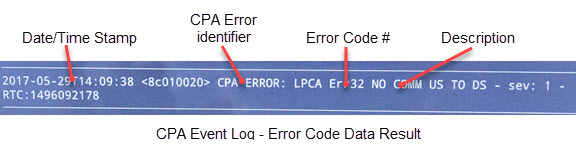
Typical CPA Event Log data:
- Error Code Data
- Event Time & Date Stamp
- Error Code Number
- Error Code Description
- Odometer
- Hours
- Motor Current*
- .Input Line Current*
- Input line voltage*
- Buss Voltage*
- OEM Factory only data
Note: * machine dependent parameter.
Removing Error Codes
Unlike the Error Log used on LED consoles (P10, P30, P30i and P31), you cannot manually delete (clear) error codes from the touchscreen console (P62, P80, and P82) CPA Event Log or the Event Log.
|
|
Note: On touchscreen consoles (P62, P80, and P82)., error codes cannot be deleted from the CPA Event Log or the Event log. |